How to Write a Resume That Gets You Interviews
A step-by-step guide to writing a resume that actually works. From picking the right format to getting AI feedback before you apply.

Laddro

Most resume advice online is generic. "Use action verbs." "Quantify your achievements." You've heard it before.
This guide is different. It walks you through building a resume step by step using Laddro, with specific examples of what works and what doesn't. By the end, you'll have a resume that passes ATS filters and gets real humans to pick up the phone.
Pick the right format
There are three resume formats. The right one depends on where you are in your career.
Chronological (most common): Lists your work experience from most recent to oldest. Use this if you have a clear career progression without major gaps. Most recruiters and ATS systems prefer this format because it's easy to scan.
Functional: Groups your experience by skills rather than by job. Use this if you're changing careers or have significant gaps. But be warned: many recruiters are suspicious of functional resumes because they can hide things.
Combination: A skills summary at the top followed by a chronological work history. Use this if you're mid-career with transferable skills that don't show clearly in your job titles.
When you open the Laddro resume builder, you can drag and drop sections into any order. Start chronological and adjust from there.
Personal information
Keep it simple:
- Full name
- Phone number
- Email address (use a professional one, not [email protected])
- City and country (you don't need your full street address)
- LinkedIn URL (if your profile is up to date)
Skip your date of birth, marital status, and photo unless the job or country specifically expects them. In most European countries, a photo is common. In the US and UK, leave it out.
Laddro's builder lets you toggle the profile photo on or off depending on the template you choose.
Professional summary
This is the 2-3 sentence section at the top of your resume. Most people waste it with vague statements like "Motivated professional seeking new opportunities."
A good summary answers three questions:
- What do you do? (your role and level)
- How long have you been doing it?
- What's your biggest measurable result?
Bad: "Experienced marketing professional with a passion for digital marketing and brand management."
Good: "Marketing manager with 6 years in B2B SaaS. Grew organic traffic from 12K to 89K monthly visits at my last company. Managed a team of 4 and a quarterly budget of EUR 120K."
The second version tells a recruiter exactly who you are in 10 seconds. That's what you're aiming for.
When you're stuck, Laddro's AI writing help can suggest a summary based on your job title and experience. You can edit it from there.
Employment history
For each job, include:
- Job title
- Company name
- Dates (month and year)
- City or location
- 3-5 bullet points describing what you did
The bullet points are where most resumes fail. Here's the formula that works:
What you did + how much + what happened as a result
Bad: "Responsible for managing social media accounts."
Good: "Managed 4 social media channels, grew LinkedIn followers from 2,100 to 11,400 in 8 months, generating 340 inbound leads."
Not every bullet needs numbers. But at least 2 out of 5 should have a measurable result. If you managed people, say how many. If you handled a budget, say the amount. If you improved something, say by how much.
If you're currently working at a job, check the "Currently working here" box in the builder. This will show "Present" instead of an end date on your resume.
If you're struggling to write strong bullet points, Laddro's AI can suggest descriptions based on your job title. It reads the role and industry and generates specific, relevant bullet points that you can customize.
Education
For most people, this is straightforward:
- Degree name (e.g., Bachelor of Science in Computer Science)
- University or institution
- Start and end dates
- City
- Relevant coursework or achievements (optional)
If you graduated more than 5 years ago, keep it short. No one cares about your GPA from 2016. If you graduated recently or are still studying, you can add relevant coursework, academic achievements, or your thesis topic.
Multiple degrees? List them from most recent to oldest, just like work experience.
Skills
Don't dump a list of 25 skills onto your resume. Focus on 8-12 that are directly relevant to the job you're applying for.
Split them into:
- Technical/hard skills: specific tools, languages, certifications (e.g., Python, Figma, CIPD Level 7, Google Analytics)
- Soft skills: only include these if they're backed up by your experience (e.g., "team leadership" only if your bullet points show you managed people)
Here's the thing most people miss: the skills on your resume should match the keywords in the job description. If the posting says "project management" and you write "managing projects," you might get filtered out by ATS software that's looking for an exact match.
When you tailor your resume with Laddro, the AI reads the job description and identifies the keywords that matter. It then rewrites your skills and experience to match the specific phrasing the employer used.
Certifications
Certifications can make or break your application in fields like IT, finance, healthcare, and project management. They show you've invested in formal training beyond your degree.
For each certification, include:
- Certification name (e.g., AWS Solutions Architect, PMP, CFA Level II)
- Issuing organization
- Date obtained (or expected date)
Only include certifications that are relevant to the job. A yoga instructor certification doesn't belong on a software engineering resume unless the company specifically values wellness.
If a certification is expired, you can still list it - just note the year you received it. If you're currently studying for one, add it with "In progress" or "Expected 2026."
Projects
Projects are especially important if you're early in your career, switching fields, or work in tech, design, or creative industries. They show what you can do beyond your job description.
For each project, include:
- Project name
- Date range
- A brief description of what you built, the tools you used, and the outcome
Good example: "Built a customer feedback dashboard using React and D3.js that reduced the product team's weekly reporting time from 4 hours to 20 minutes. Used by 12 team members across 3 departments."
Don't just list the project name and tech stack. Explain what problem it solved and who benefited.
Side projects, freelance work, open-source contributions, and academic projects all count. If you contributed to something publicly available, link to it.
Languages
In international job markets, language skills can set you apart. List each language with your proficiency level:
- Native / Bilingual: Your first language or equivalent
- Fluent / Professional: You can work entirely in this language
- Intermediate / Conversational: You can hold meetings and write emails
- Basic: You understand fundamentals but can't work in it
Be honest. Claiming "fluent" in French when you can barely order coffee will come back to bite you in the interview.
Only include languages that add value. If you're applying in Germany and speak German, English, and Spanish, list all three. If you know a few words of Japanese from Duolingo, leave it out.
References
References are people who can vouch for your work - typically former managers, colleagues, or clients.
For each reference, include:
- Full name
- Job title and company
- Email address
- Phone number
In many countries and industries, it's perfectly acceptable to write "References available upon request" instead of listing them directly. This saves space and protects your references' contact information until an employer actually needs it.
If you do list references:
- Ask permission first (always)
- Choose people who can speak to the specific skills the job requires
- Avoid listing family members or personal friends
- 2-3 references is standard
Extra-curricular activities
This section is most valuable for students, recent graduates, and career changers who need to fill gaps or show well-rounded experience.
Include activities that demonstrate:
- Leadership: club president, team captain, committee chair
- Initiative: founded a student organization, organized events
- Relevant skills: debate team (communication), hackathon participation (tech skills), volunteer tutoring (teaching)
For each activity, include the name, your role, dates, and a brief description of what you did or achieved.
If you've been working for 10+ years, you probably don't need this section unless the activity is directly relevant to the job.
Custom sections
Sometimes your experience doesn't fit neatly into the standard resume categories. That's what custom sections are for.
Common custom sections include:
- Publications: academic papers, articles, blog posts
- Awards & Honors: employee of the year, industry awards, scholarships
- Volunteer work: if it's substantial enough to warrant its own section
- Courses & Training: online courses, bootcamps, workshops
- Hobbies & Interests: only if they're genuinely interesting or relevant (e.g., "competitive chess" for an analytical role, not "watching Netflix")
In Laddro's builder, you can create as many custom sections as you need and name them whatever you want. Drag them into the right position in your resume order.
Make it pass ATS filters
Over 90% of large companies use Applicant Tracking Systems to screen resumes before a human sees them. If your resume doesn't pass the ATS, it doesn't matter how good it is.
Here's what breaks ATS:
- Tables and columns (the parser can't read them correctly)
- Text boxes and graphics
- Headers and footers (many ATS systems ignore them entirely)
- Unusual fonts or embedded images
- PDF files created from design tools like Canva (they often flatten text into images)
Here's what helps:
- Clean, single-column layouts
- Standard section headings (Work Experience, Education, Skills)
- Keywords from the job description
- PDF exported from a proper resume builder
Every template in Laddro is tested against ATS systems. No tables, no text boxes, no parsing errors. You pick the design, Laddro handles the technical formatting.
Get feedback before you send it
This is where most people skip a step. They finish writing and immediately start applying. Don't.
Laddro's AI feedback reads your entire resume, not just the text. It looks at:
- Your content (are the right keywords there?)
- Your template and colours (are they readable and professional?)
- Your target job (does your resume match what the employer is looking for?)
- Your structure (are sections in the right order?)
Then it gives you specific actions: "Add the headcount you managed at your last role." "Your colour scheme has low contrast, switch to a darker header." "You're missing the keyword 'stakeholder management' that appears 3 times in the job description."
This is different from generic resume checkers that just count keywords. Laddro reads the whole picture.
Tailor it for every job you apply to
Sending the same resume to 50 jobs is the number one reason people don't hear back. Each job description is different. Each ATS is looking for different keywords. One version of your resume can't match all of them.
This doesn't mean rewriting from scratch every time. It means adjusting:
- Your summary (to match the role)
- Your bullet points (to emphasize relevant experience)
- Your skills (to mirror the job description)
With Laddro, you can paste any job description and get a tailored version in under a minute. The AI rewrites your resume for that specific role and can generate a matching cover letter at the same time.
Add a cover letter
Not every job requires one. But when a posting says "cover letter optional," sending one puts you ahead of the 70% of applicants who don't bother.
A good cover letter does three things:
- Explains why you want this specific job at this specific company
- Highlights 1-2 achievements from your resume that are most relevant
- Shows you've read the job description (reference something specific from it)
Laddro's cover letter builder can generate one from your resume and the job description. It matches the visual design of your resume so your application looks cohesive.
Final checklist
Before you hit send:
- Is your contact info correct and current?
- Does your summary mention a specific result or number?
- Do at least half your bullet points include a measurable outcome?
- Are your skills matching the keywords in the job description?
- Is the resume one page (or two if you have 10+ years of experience)?
- Have you run it through ATS scoring to check compatibility?
- Is the template clean, readable, and professional?
- Do you have a tailored version for this specific job?
If you can check all of these, your resume is ready.
Start building
Create your resume for free with Laddro. Pick a template, fill in your details, and get AI feedback before you download. No sign-up needed to start.
Want to see what a finished resume looks like? Browse resume examples by industry for inspiration.
Ready to build your resume?
Put this into practice. Open the builder and create your resume step by step.
Free to use. No account needed to start.
Related articles

AI Is Screening Your Resume Before Any Human Sees It
AI screens most resumes before a human ever reads them. 97.4% of Fortune 500 companies run an ATS. This is what that means for you and what you can do about it.

The Best Resume Builders in 2026, Compared Honestly
Resume.io, Zety, Enhancv, Kickresume, Teal, and Laddro compared honestly: real pricing, free tiers, mobile apps, and where each tool wins. All prices checked in September 2026.

Burnout Recovery: A Real Timeline, Not 'Take a Bubble Bath'
55% of the U.S. workforce is burned out. Recovery takes 3 to 12 months. Here's what that actually looks like, stage by stage.
Related resume examples
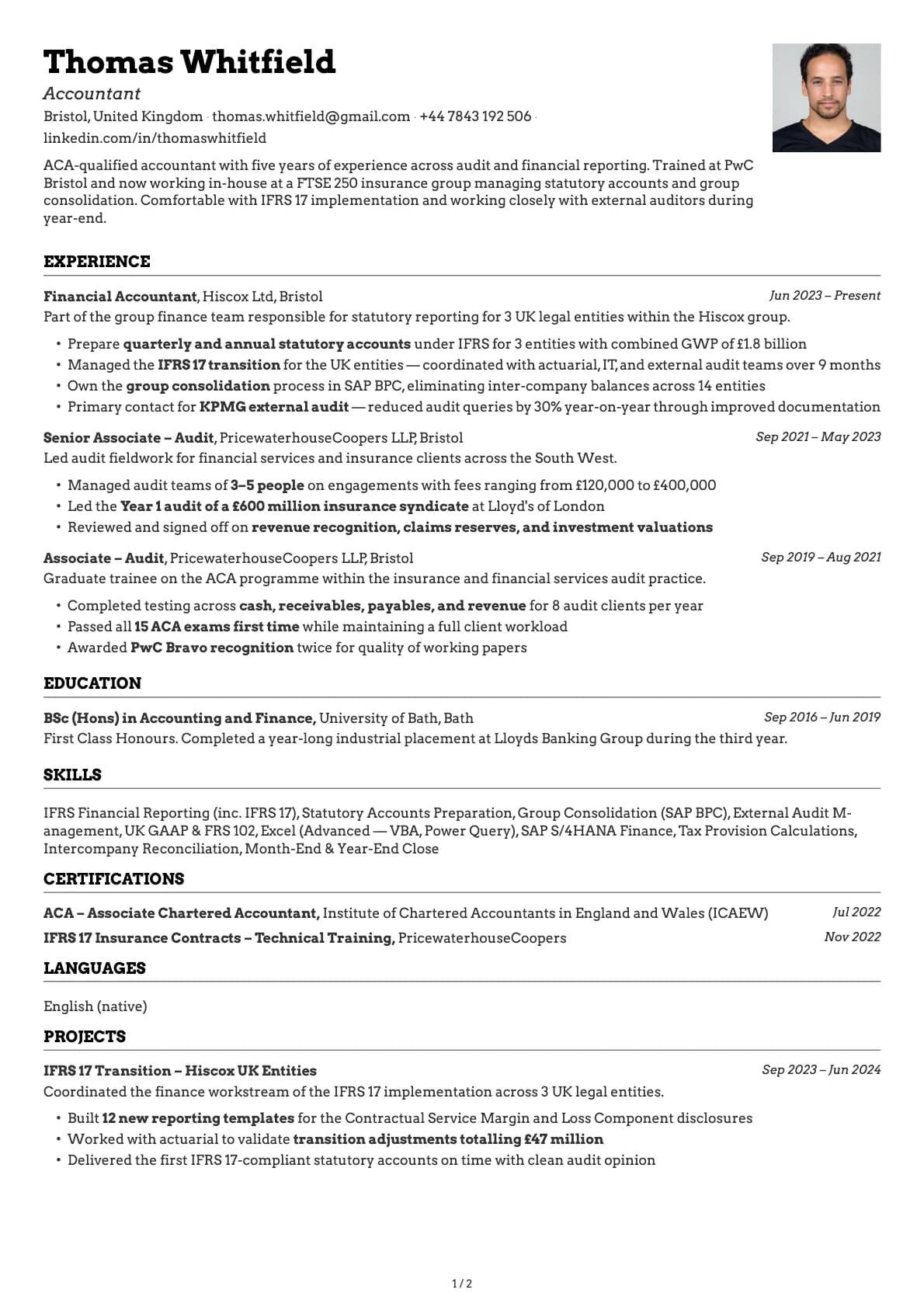
Accountant
An ACA-qualified accountant resume example with Big 4 audit experience and FTSE 250 in-house reporting.
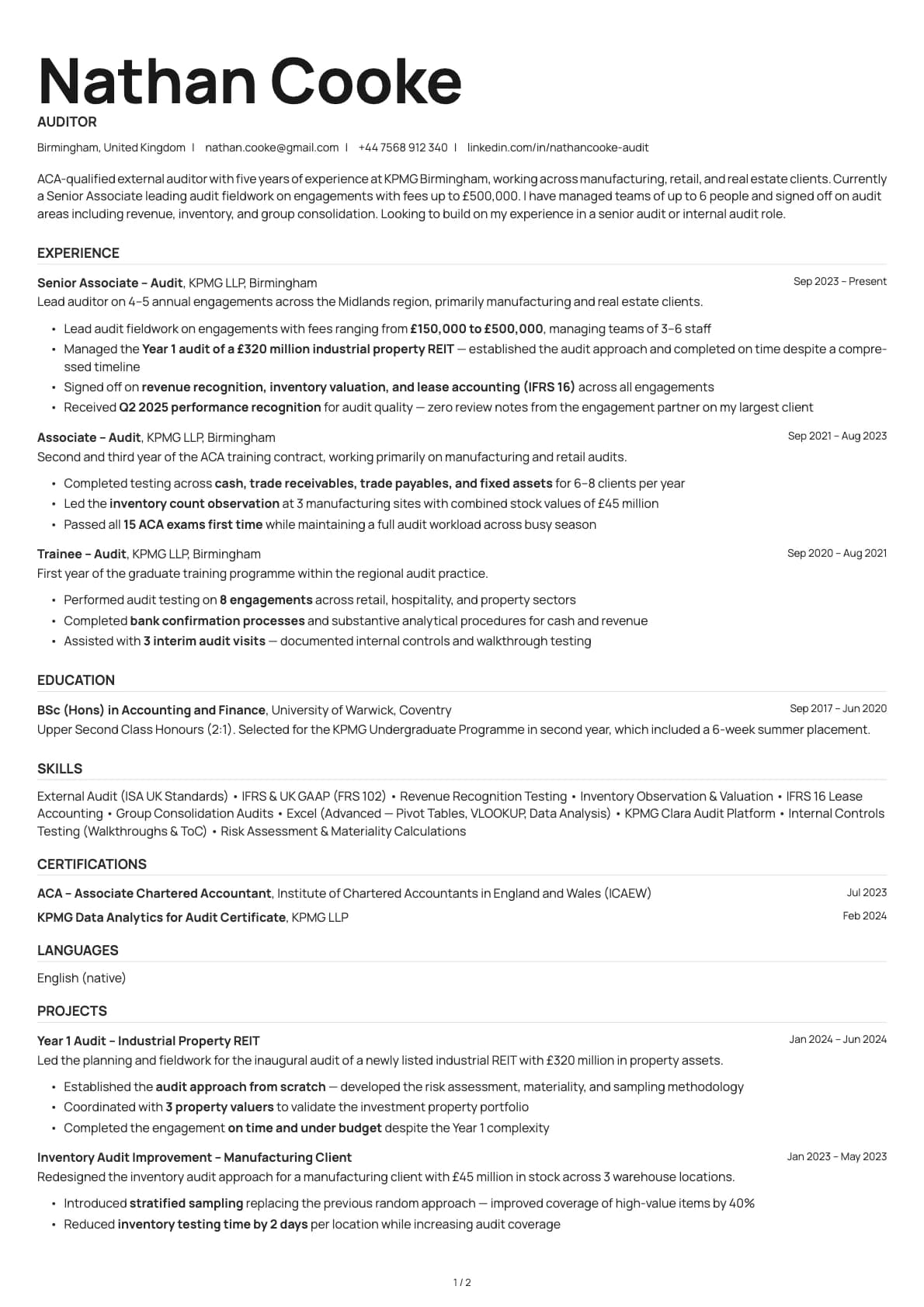
Auditor
An ACA-qualified auditor resume example from KPMG with engagement fee ranges, team management, and ISA Standards experience across manufacturing and real.
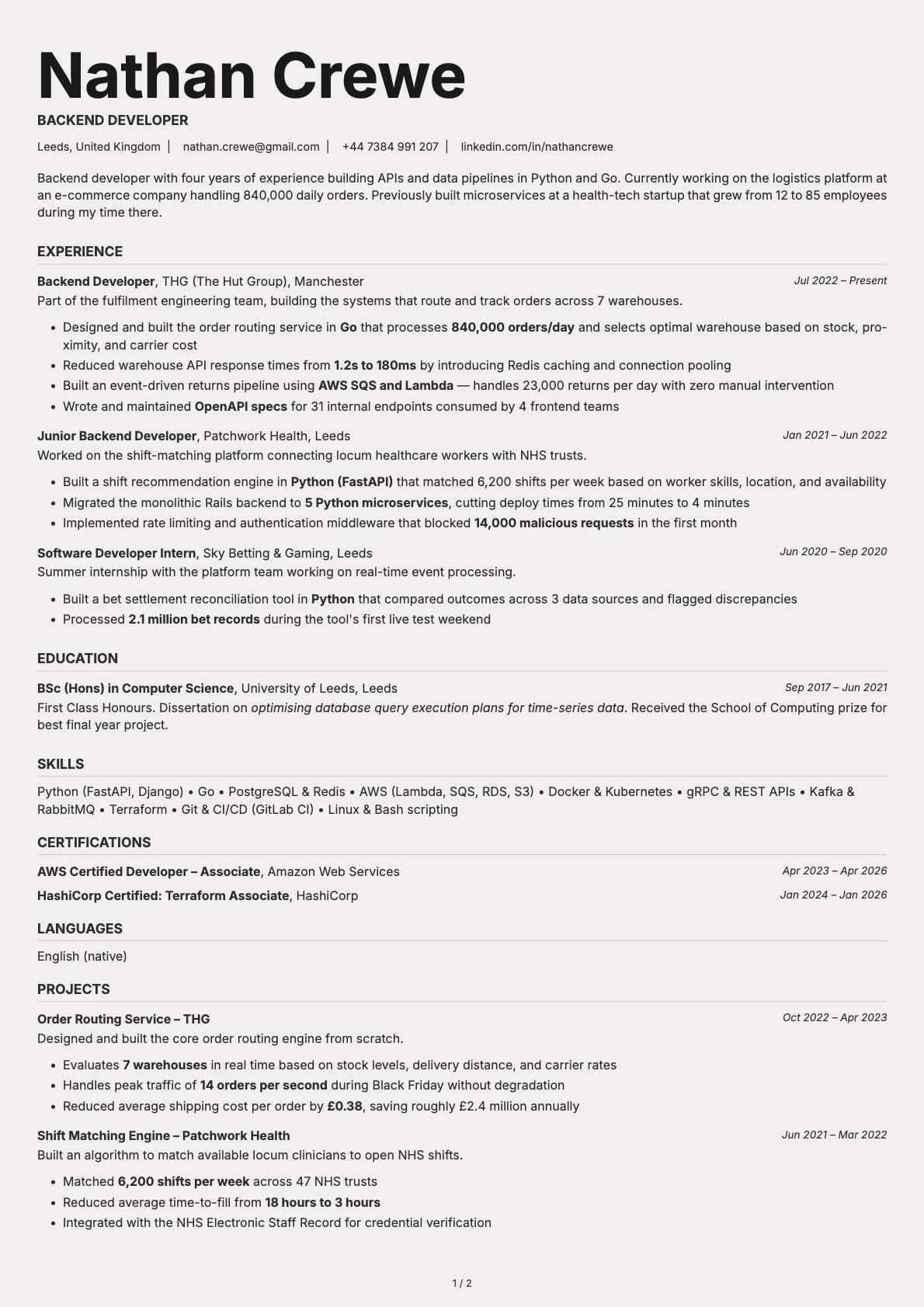
Backend Developer
A backend developer resume example with Go and Python experience, system throughput numbers, and infrastructure projects across e-commerce and health-tech.