Skip to content
LaddroLaddro
LaddroLaddro
Pricing
Sign inGet started free→
Guided BuilderNewStep-by-step resume creation with AI coaching.
Standard EditorFull control with a professional drag-and-drop editor.
Tailor ResumeRewrite your resume to match any job description.
Cover LetterGenerate tailored cover letters in minutes.
Job TrackerTrack every application in one place.
AI Resume ReviewGet instant feedback and an ATS score.
LinkedIn OptimizerOptimize your LinkedIn profile from your resume.
Resume TemplatesBrowse 30+ professional templates.
Cover Letter TemplatesMatching designs for every resume template.

Use Cases

First ResumeBuild your very first resume from scratch.
Career ChangeReframe your experience for a new direction.
Return to WorkAddress career gaps with confidence.
Applying AbroadAdapt your resume for international markets.
Job TrackingManage your entire job search in one dashboard.
ATS OptimizationPass automated screening systems.

Who It's For

GraduatesHighlight education, projects, and potential.
Career ChangersPivot your narrative to a new industry.
ReturnersRe-enter the workforce after a break.
Non-Native ApplicantsWrite in 14 languages with localized formats.

Partners

UniversitiesResume support for your students at scale.
BootcampsHelp graduates land their first role.
Career ServicesLet the tool handle the basics, you focus on coaching.
Employment AgenciesGet candidates placement-ready in minutes.

Learn

BlogCareer tips, resume advice, and product updates.
All GuidesEverything you need to know about resumes and cover letters.

Examples & Templates

Resume Examples100+ examples sorted by industry.
Cover Letter ExamplesReal cover letters for real jobs.
Resume Templates30+ professional designs.
Cover Letter TemplatesModern, creative, and classic styles.

Support

FAQCommon questions answered.
ContactGet in touch with our team.
PricingSimple, transparent plans.

Resume Writing

How to Write a ResumeStep-by-step guide with templates and examples.
How to Write a Cover LetterMake recruiters read your application.
Your First ResumeNever written one before? Start here.
ATS Resume GuidePass automated screening systems.

Resume Formats

Chronological ResumeThe most common format, organized by date.
Functional ResumeSkills first, experience second.
Combination ResumeBest of both formats in one.
Best Free Resume BuildersCompared and reviewed.

Specific Situations

Career Change ResumeReframe your experience for a new field.
Resume After Career GapAddress time off with confidence.
Resume for Jobs AbroadAdapt to international markets.
Resume for University StudentsTurn coursework into a real CV.
Resume After BootcampLand your first tech role.

AI & Agents

MCP ServerPopularConnect Laddro to Claude, Cursor, and any MCP client.
Claude Code SkillsNewUse Laddro directly inside Claude Code.
AI AgentsNewBuild career automation agents with the API.

Platform

DocumentationGuides, tutorials, and full API reference.
API ReferenceComplete endpoint documentation.
ConsoleNewManage API keys, usage, and billing.
CLINewUse Laddro from your terminal.

SDKs

TypeScriptnpm install @laddro/career-sdk
Pythonpip install laddro-career
Gogo get github.com/laddro-app/laddro-career-sdk-go
All SDKsJava, Rust, PHP, Ruby, .NET, and more.
Guided BuilderNewStep-by-step resume creation with AI coaching.Standard EditorFull control with a professional drag-and-drop editor.Tailor ResumeRewrite your resume to match any job description.Cover LetterGenerate tailored cover letters in minutes.

More

Job TrackerTrack every application in one place.AI Resume ReviewGet instant feedback and an ATS score.LinkedIn OptimizerOptimize your LinkedIn profile from your resume.

Templates

Resume TemplatesBrowse 30+ professional templates.Cover Letter TemplatesMatching designs for every resume template.

Use Cases

First ResumeBuild your very first resume from scratch.Career ChangeReframe your experience for a new direction.Return to WorkAddress career gaps with confidence.Applying AbroadAdapt your resume for international markets.Job TrackingManage your entire job search in one dashboard.ATS OptimizationPass automated screening systems.

Who It's For

GraduatesHighlight education, projects, and potential.Career ChangersPivot your narrative to a new industry.ReturnersRe-enter the workforce after a break.Non-Native ApplicantsWrite in 14 languages with localized formats.

Partners

UniversitiesResume support for your students at scale.BootcampsHelp graduates land their first role.Career ServicesLet the tool handle the basics, you focus on coaching.Employment AgenciesGet candidates placement-ready in minutes.

Learn

BlogCareer tips, resume advice, and product updates.All GuidesEverything you need to know about resumes and cover letters.

Examples & Templates

Resume Examples100+ examples sorted by industry.Cover Letter ExamplesReal cover letters for real jobs.Resume Templates30+ professional designs.Cover Letter TemplatesModern, creative, and classic styles.

Support

FAQCommon questions answered.ContactGet in touch with our team.PricingSimple, transparent plans.

Resume Writing

How to Write a ResumeStep-by-step guide with templates and examples.How to Write a Cover LetterMake recruiters read your application.Your First ResumeNever written one before? Start here.ATS Resume GuidePass automated screening systems.

Resume Formats

Chronological ResumeThe most common format, organized by date.Functional ResumeSkills first, experience second.Combination ResumeBest of both formats in one.Best Free Resume BuildersCompared and reviewed.

Specific Situations

Career Change ResumeReframe your experience for a new field.Resume After Career GapAddress time off with confidence.Resume for Jobs AbroadAdapt to international markets.Resume for University StudentsTurn coursework into a real CV.Resume After BootcampLand your first tech role.

AI & Agents

MCP ServerPopularConnect Laddro to Claude, Cursor, and any MCP client.Claude Code SkillsNewUse Laddro directly inside Claude Code.AI AgentsNewBuild career automation agents with the API.

Platform

DocumentationGuides, tutorials, and full API reference.API ReferenceComplete endpoint documentation.ConsoleNewManage API keys, usage, and billing.CLINewUse Laddro from your terminal.

SDKs

TypeScriptnpm install @laddro/career-sdkPythonpip install laddro-careerGogo get github.com/laddro-app/laddro-career-sdk-goAll SDKsJava, Rust, PHP, Ruby, .NET, and more.
Pricing
Build your CV→Sign in
Home/Resume Templates/Vanta
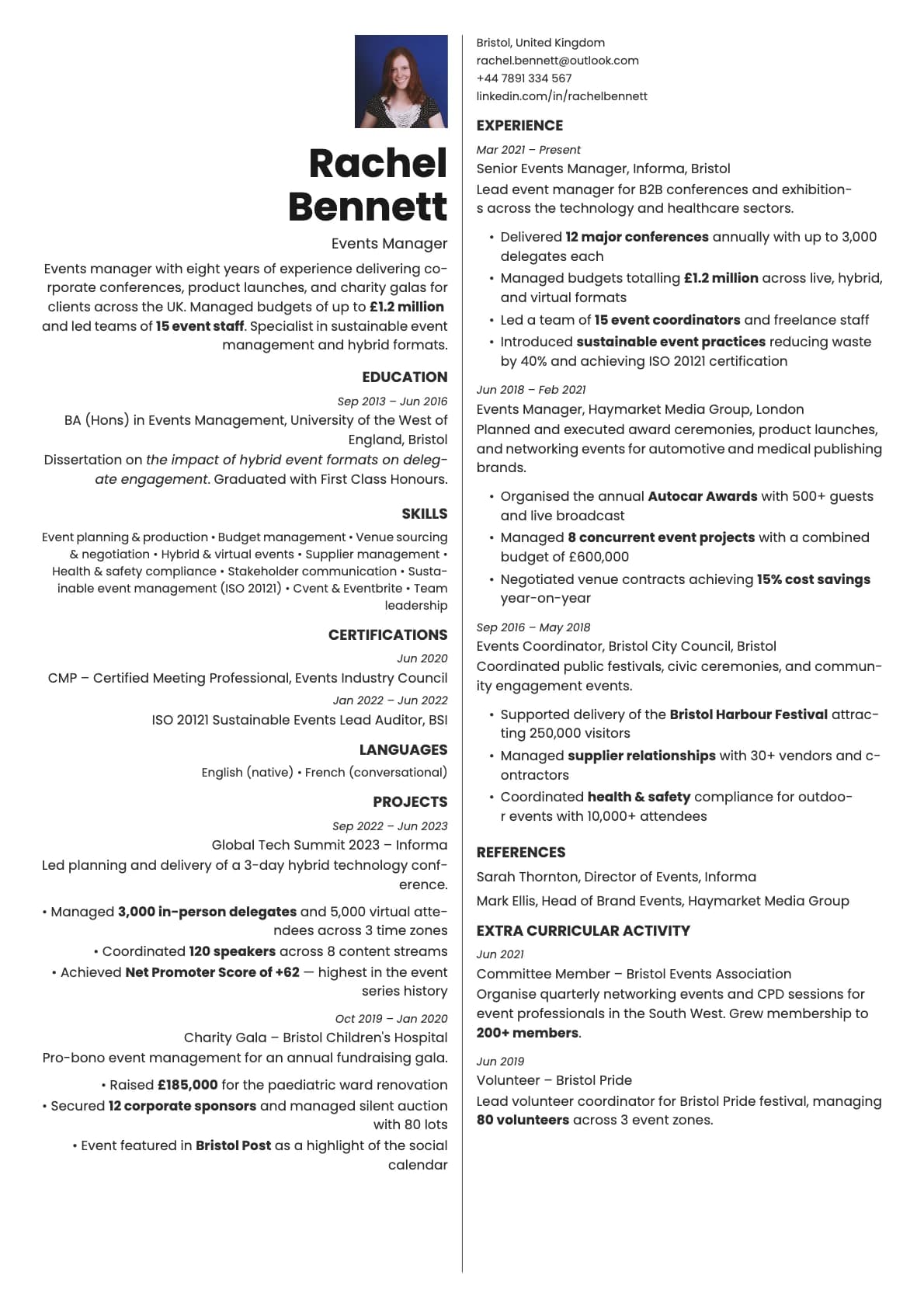
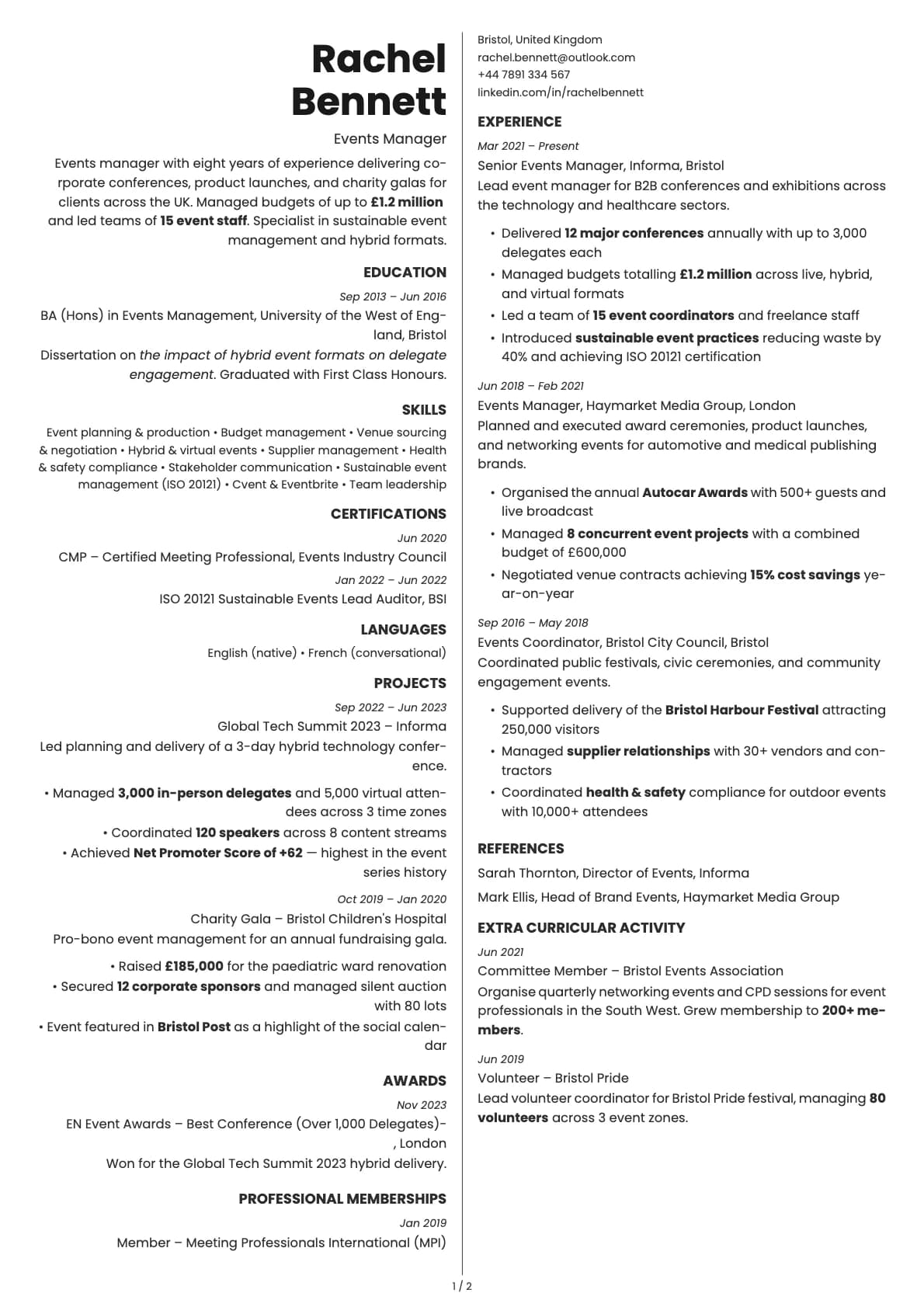
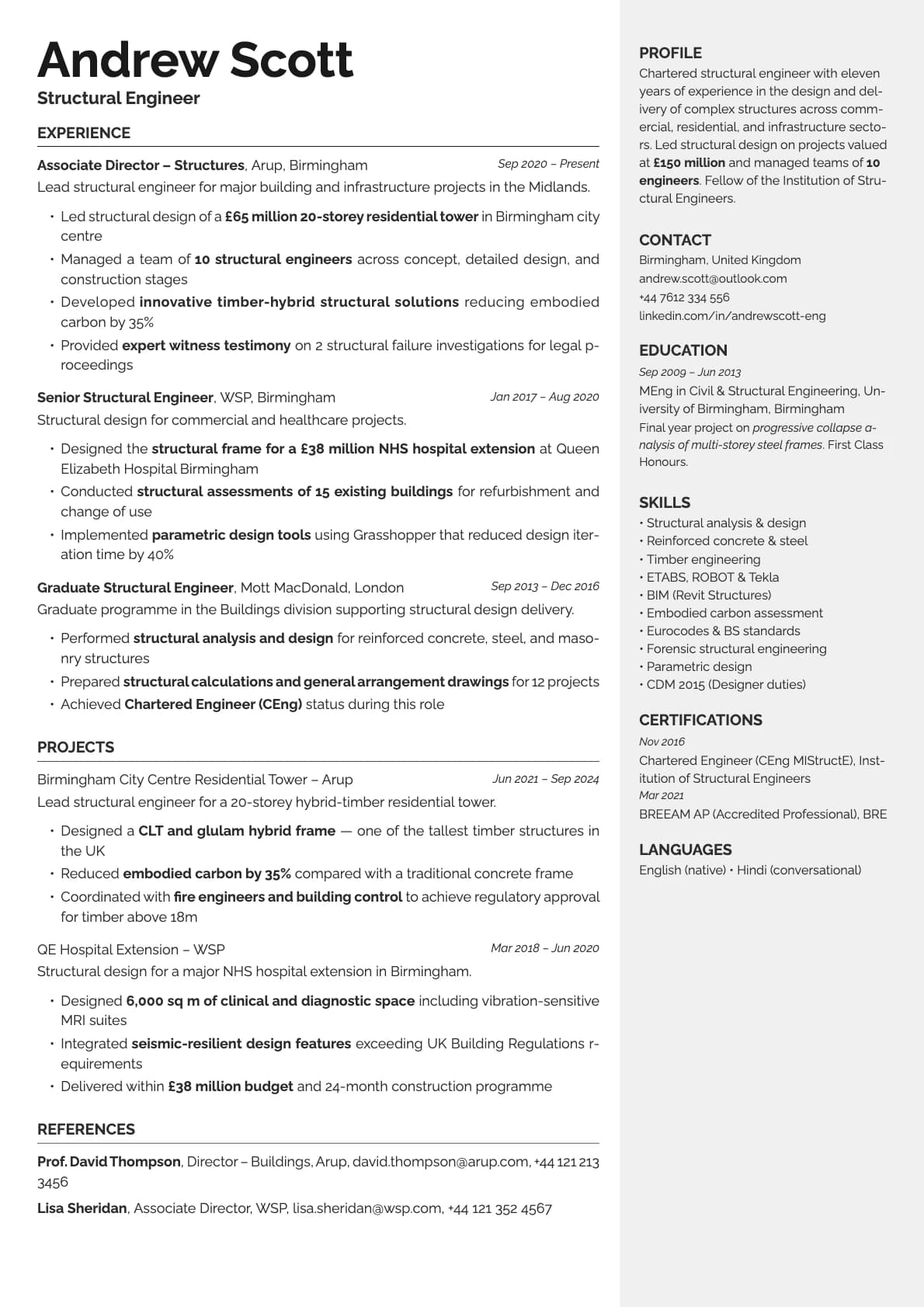
Vanta colour variant 1
Use this template
ATS 6/10Header + Two-Column

Vanta Resume Template

No ratings yet

A modern creative resume template with a centred name header and two-column body. 8 colour options, ATS score 6.0/10. Build yours free on Laddro.

Avrile Sans 8 coloursModernCreative
Use this template With photo

On this page

Why Vanta?Who should use this template?What you getATS compatibilityColour optionsTips for getting the most out of VantaBuild your resume with Vanta on Laddro

Why Vanta?

Vanta centres your name at the top of the page and tucks contact details into a right sidebar. The two-column body below handles the rest. It is a high-contrast, black-and-white template where the typography and spacing do the work instead of colour.

The name "Vanta" comes from the idea of vantablack, the darkest black. The design philosophy follows that lead: sharp contrast, clean lines, nothing extra. All 8 colour variations use a white background with black text. The differences between them are subtle, sitting in the weight and spacing of typographic elements rather than colour shifts.

This is a template for people who think a well-set page of black text on white paper is more impressive than any colour accent.

Who should use this template?

Vanta fits writers, editors, researchers, architects, and anyone whose work is about precision and clarity. It also works well for senior professionals in any field who want their resume to feel mature and confident without relying on visual tricks.

It is a strong choice for direct applications and recruiter submissions. The clean black-and-white look prints well, photographs well (useful for portfolio sites), and reads clearly on any screen.

If you want a two-column layout with more visual personality, Aurum adds colour accents and a different header structure. Opal goes further with purple and iridescent tones for a distinctly creative feel. And if you want colour blocks alongside a single-column body, Bold Edge pairs a decorative sidebar with an 8.0/10 ATS score.

What you get

  • A centred name header with contact details in a right sidebar
  • A two-column body layout for structured content
  • 8 colour variations, all black-and-white with subtle typographic differences
  • The default font is Avrile Sans, a humanist sans-serif with slightly softer edges than most geometric fonts. You can switch to any font in Laddro (Inter, Poppins, Arvo, Lora, Century Gothic, and others) in one click
  • Photo support, placed alongside the header
  • Multi-page support for longer resumes

ATS compatibility

Vanta scores 6.0/10. The two-column body layout is the main factor, same as most other two-column templates. The centred name and sidebar contact details can also cause minor parsing issues with older ATS systems that expect a left-aligned, stacked header format.

For applications through job portals, keep a single-column backup version ready. For direct sends, the ATS score does not matter. The person opening the PDF sees a sharply designed page that communicates professionalism immediately.

Colour options

All 8 variations use white backgrounds with black text. The differences between them are intentionally subtle, focusing on typographic weight, spacing, and the treatment of section dividers rather than colour.

This is not a limitation. It is the template's defining feature. Vanta trusts that good typography, clear hierarchy, and proper spacing are enough to make a resume stand out. If you want colour, this is not the right template for you.

Tips for getting the most out of Vanta

  1. Let the typography breathe. Vanta looks best when you are not cramming content into every corner. If your resume feels too dense, cut content rather than shrinking the font.
  2. Pay attention to your section headings. With no colour to guide the eye, the hierarchy of your headings and content has to be clear on its own. Make sure section titles are distinct and consistent.
  3. Use the right sidebar for contact info, links, and concise supporting details. Keep your main experience in the wider left column.
  4. Print a test copy. Black and white resumes are heavily affected by paper quality and printer settings. Make sure it looks as sharp on paper as it does on screen.

Build your resume with Vanta on Laddro

Start building with Vanta. Fill in your details, switch fonts in real time, and download a PDF when you are ready. No account needed to start.

How would you rate this template?

Your rating helps others pick the right template for their resume.

Similar templates

View all templates→
Amber Photo resume template preview
Amber Photo6/10
Amber resume template preview
Amber6/10
Aurum Photo resume template preview
Aurum Photo6.5/10
Aurum resume template preview
Aurum6.5/10
LaddroLaddro

Know someone job hunting? Share Laddro with them.

GDPR Compliant

Hosted in the EU

Your Data is Yours

We never sell your data

Featured on BetaList

Product

  • Guided Builder
  • Standard Editor
  • Tailor Resume
  • Cover Letter
  • Job Tracker
  • AI Resume Review
  • LinkedIn Optimizer
  • Resume Templates

Use Cases

  • First Resume
  • Career Change
  • Return to Work
  • Applying Abroad
  • ATS Optimization
  • University Students
  • Bootcamp Graduates

Resources

  • Blog
  • How to Write a Resume
  • How to Write a Cover Letter
  • Resume Formats
  • Resume Examples
  • Cover Letter Examples
  • Resume Templates
  • Cover Letter Templates
  • Laddro vs Zety
  • Laddro vs Resume.io
  • Best Free Resume Builders

Company

  • About
  • Contact
  • Pricing
  • FAQ
  • Privacy Policy
  • Terms & Conditions
  • Impressum
  • Sitemap

GDPR Compliant

Hosted in the EU

Your Data is Yours

We never sell your data

Featured on BetaList

© 2026 Laddro Digital UG (haftungsbeschränkt) All rights reserved.